

Note:
This software is common for DC-901, DP-720, DP-550, DP-410 and DAC-40.
The software for DC-950, DP-560, DP-430 and DAC-50 is here.
The software for DC-37 is here.
The software for DC-1000, DP-770, DP-750, DP-570, DP-450 and DAC-60 is here.
The software for DP-570S is here.
The old software(Ver1.3) is here.
Supported operating systems:
Windows 8.1(64/32bit) / Windows 7(64/32bit).
*If your operating system is Windows 11 or 10, you do not need to install any drivers.
Updating procedures
- Click "Download" in the USB utility Setup files below and save it to the appropriate location.
- Unzip the "USButy_v1r4.zip".
Right-click on the zip file and select "Extract All" to create the folder and unzip all files. - After extraction
- Follow the instructions in USB_Utilities_Setup_Guide(.pdf) to install.
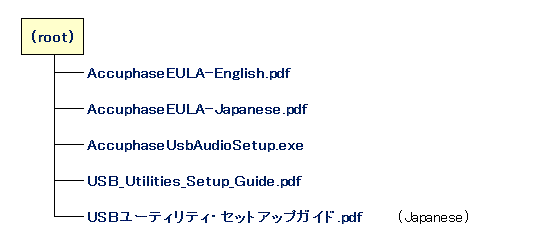
USB utility set up files
USButy_v1r4.zip (ZIP compressed file, 5.92 Mbytes)
Download
For inquiries
For any question, please contact your local Accuphase Distributor.
 Accuphase Laboratory, Inc.
enrich life through technology